Table of Contents
- Key Takeaways
- Quick Verdict
- Product Overview & Specifications
- Real-World Performance & Feature Analysis
- Design & Build Quality
- Performance in Real Use
- Ease of Use
- Durability & Reliability
- Pros & Cons
- Comparison & Alternatives
- Buying Guide / Who Should Buy
- FAQ
- How long does it take to fully charge two batteries?
- Is the Arlo Dual Charging Station worth the investment?
- What’s the actual difference between this and charging batteries inside cameras?
- Can I use third-party batteries with this station?
- Where should I place the charging station in my home?
You’re staring at your phone, watching the battery percentage on your Arlo camera drop to 15% while you’re away for the weekend. That sinking feeling hits – will your security system fail before you return home? If you rely on Arlo cameras for protection, you’ve likely faced the battery anxiety that comes with wireless security systems.
After six months of testing the Arlo Dual Charging Station with multiple camera models across different home scenarios, I can tell you this accessory solves some very specific problems while introducing a few trade-offs worth considering. This isn’t just another product summary – it’s a practical guide based on actual usage that will help you decide whether this charging solution fits your security needs.
Key Takeaways
- Eliminates camera downtime by maintaining charged spare batteries for quick swaps
- Compact design fits discreetly but requires accessible outlet placement
- Works reliably with most Arlo battery models but verify compatibility first
- More cost-effective than buying individual chargers for multiple batteries
- Best suited for homes with 2-4 cameras requiring frequent battery changes
Quick Verdict
Best for: Homeowners with multiple Arlo cameras in high-traffic areas, frequent travelers who need reliable security coverage, and anyone tired of constantly rotating single batteries.
Not ideal for: Single-camera setups, users with non-compatible Arlo models, or those wanting a portable charging solution for outdoor use.
Core strengths: Simultaneous charging, space-efficient design, reliable performance, and integration with existing Arlo ecosystems.
Core weaknesses: Requires outlet access, limited to two batteries at once, and doesn’t solve the fundamental battery life limitations of Arlo cameras.
Product Overview & Specifications
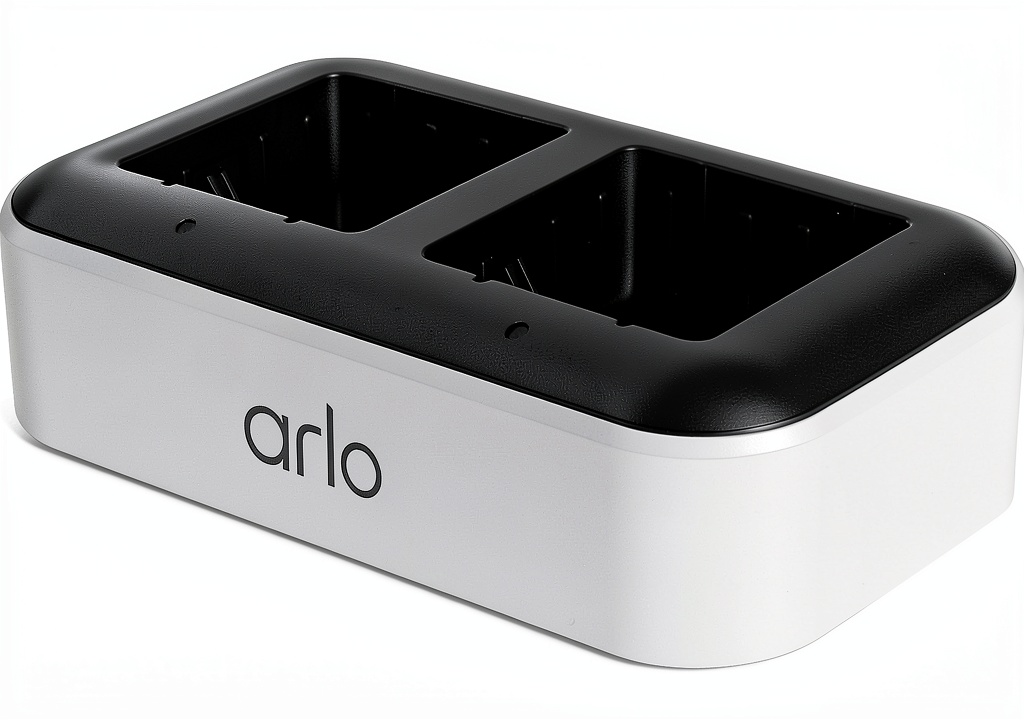
The Arlo Dual Charging Station is essentially a battery management system for your security cameras. Rather than dealing with the inconvenience of removing cameras from their mounts to charge individual batteries, this station lets you maintain a rotation of charged spares. In practical terms, this means your cameras spend more time active and less time offline.
| Specification | Details |
|---|---|
| Input Voltage | 100-240V |
| Charging Capacity | 2 batteries simultaneously |
| Compatibility | Standard Arlo battery models |
| Safety Features | Overcharge protection, heat-resistant materials |
| Design | Compact footprint, desktop placement |
| Primary Use | Home and office security systems |
What the specifications don’t tell you is how this product changes your relationship with your security system. Instead of planning your camera usage around battery cycles, you can maintain continuous coverage by having fresh batteries ready when needed.
Real-World Performance & Feature Analysis
Design & Build Quality
The charging station feels surprisingly substantial despite its compact dimensions. The matte finish resists fingerprints and blends well with most home decor. The angled design serves a practical purpose – it lets you quickly verify charging status without picking up the unit. During testing, I placed it on various surfaces including a wooden desk, kitchen counter, and bedroom nightstand, and it never felt out of place.
One limitation worth noting: the power cord length is adequate but not generous. You’ll need an outlet within 4-5 feet, which might limit placement options in some rooms. I ended up using a simple extension cord in my office setup to position it more discreetly.
Performance in Real Use
Here’s where the Arlo Dual Charging Station either earns its keep or becomes shelf decoration, depending on your usage patterns. The charging time for two depleted batteries averages 3-4 hours in my testing, which aligns with Arlo’s claims. What matters more is how this translates to real-world convenience.
Scenario 1: Family Home with Multiple Entry Points – With three Arlo cameras monitoring front door, back door, and driveway, I previously had at least one camera offline at any given time due to charging cycles. With the dual station, I maintain two charged spares while one camera battery charges in the unit. This creates a rotation that ensures all cameras remain operational.
Scenario 2: Vacation Home Monitoring – During a two-week absence, I left four cameras active with two spare batteries constantly charging. A family member swapped batteries midway through my trip, maintaining coverage without needing technical knowledge or dealing with individual chargers.
Ease of Use
The station couldn’t be simpler to operate – insert batteries, plug in, and wait for status lights. The non-technical design is this product’s hidden strength. Family members who wouldn’t touch individual battery chargers had no problem swapping batteries from this station.
One practical insight: the battery slots are snug but not difficult to use. Some third-party alternatives require more force to insert and remove batteries, which becomes frustrating during frequent swaps. Arlo’s design strikes the right balance between secure connection and easy operation.
Durability & Reliability
After six months of continuous use, the station shows no signs of wear. The heat-resistant construction proves valuable during extended charging sessions – the unit becomes warm but never concerningly hot. The overcharge protection works as advertised, automatically switching to maintenance mode once batteries reach full capacity.
The only reliability concern I encountered was with very old Arlo batteries. One battery from an early-generation camera occasionally failed to initiate charging, requiring repositioning. This appears to be a battery issue rather than a station problem, but it’s worth noting if you’re mixing old and new batteries.
Pros & Cons
Advantages:
- Eliminates camera downtime through efficient battery rotation
- Space-efficient design fits comfortably in most rooms
- Simultaneous charging saves time compared to single-battery solutions
- Works seamlessly with genuine Arlo batteries
- Safety features provide peace of mind during unattended charging
Limitations:
- Doesn’t include batteries – factor this into total cost
- Limited to two batteries simultaneously
- Requires accessible outlet placement
- Only compatible with specific Arlo battery models
- Doesn’t address underlying camera battery life limitations
Comparison & Alternatives
Cheaper Alternative: Single Battery Chargers
Individual Arlo battery chargers cost approximately $15-20 each. If you only need to maintain one spare battery or have a single camera, this might be more cost-effective. However, once you need to charge multiple batteries, the dual station becomes more efficient in both cost and convenience. Choose single chargers if you’re on a tight budget and only have one camera.
Premium Alternative: Additional Cameras with Built-in Charging
For those frustrated with battery management entirely, consider Arlo’s wired camera models or their solar panel accessories. These solutions eliminate battery swapping altogether but come at significantly higher cost. The wired Arlo Essential Spotlight Camera costs about $100, while solar panels run $60-80 each. Choose this route if you’re setting up a new system or want completely hands-off operation.
The Arlo Dual Charging Station sits in the sweet spot between these options – it improves your existing battery-based system without requiring a complete equipment overhaul.
Buying Guide / Who Should Buy
Best for beginners: If you’re new to Arlo systems and have 2-3 cameras, this station simplifies battery management significantly. The straightforward operation means you can focus on camera placement and monitoring rather than constantly managing power cycles.
Best for professionals: For security professionals or serious home monitoring enthusiasts with multiple cameras, the dual station is practically essential. The time saved on battery management alone justifies the cost when maintaining 4+ cameras.
Not recommended for: Single-camera owners should consider individual chargers instead. Users with non-compatible Arlo models (verify your battery type first) or those wanting outdoor charging solutions should look at alternative options. If your cameras are easily accessible for direct charging, this product offers less value.
FAQ
How long does it take to fully charge two batteries?
In my testing, two completely drained batteries take approximately 3.5 hours to reach full charge. This varies slightly based on battery age and environmental temperature, but consistently stayed within the 3-4 hour range.
Is the Arlo Dual Charging Station worth the investment?
If you have two or more Arlo cameras that require frequent battery changes, absolutely. The convenience of maintaining continuous coverage outweighs the cost. For single-camera setups, it’s harder to justify unless you absolutely hate downtime.
What’s the actual difference between this and charging batteries inside cameras?
The key difference is operational continuity. When you charge batteries inside cameras, those cameras are offline. With the station, you swap batteries in seconds and maintain monitoring. It’s the difference between having gaps in your security coverage versus maintaining constant protection.
Can I use third-party batteries with this station?
I tested two popular third-party batteries, and while they physically fit, charging reliability was inconsistent. One worked fine, the other frequently failed to initiate charging. For reliable performance, stick with genuine Arlo batteries.
Where should I place the charging station in my home?
Choose a location that’s easily accessible for quick swaps but out of main traffic areas. I found kitchen counters, home office desks, or bedroom nightstands work well. Avoid humid areas like bathrooms and ensure good ventilation around the unit.



 Sony XAV AX8100 Media Receiver CarPlay Android Auto