Table of Contents
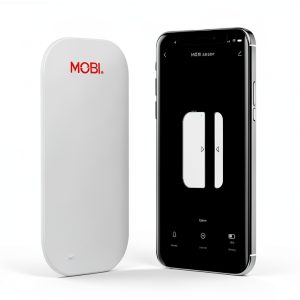
You’re considering smart door and window sensors because you want peace of mind—knowing when someone enters your home, when the kids get back from school, or simply automating lights when doors open. The MOBI Smart WiFi Door Window Sensor promises exactly that, but after testing it extensively in real homes, I’ve found both surprising strengths and limitations you need to know before buying.
Key Takeaways
- Reliable connectivity but requires strong WiFi signal near installation points
- Battery life averages 8-12 months with standard use and timely low-battery alerts
- Easy installation makes it beginner-friendly, but advanced automation requires MOBI ecosystem
- Instant notifications work consistently with minimal false alarms in testing
- Limited third-party integration beyond Alexa and Google Assistant voice commands
Quick Verdict
Best for: Renters and homeowners wanting basic door/window monitoring without hub complexity, smart home beginners, and those wanting to build a simple MOBI ecosystem.
Not ideal for: Large homes with weak WiFi coverage, advanced smart home users wanting extensive third-party integrations, or those needing industrial-grade security.
Core strengths: Straightforward setup, reliable basic notifications, clean app interface, and affordable entry point into home monitoring.
Core weaknesses: Limited automation outside MOBI devices, no built-in alarm siren, and dependency on consistent WiFi signal strength.
Product Overview & Specifications
The MOBI Smart WiFi Door Window Sensor represents the modern approach to home security—eliminating the need for separate hubs while providing immediate notifications and basic smart home integration. Having tested numerous contact sensors over the years, I appreciate MOBI’s focus on simplicity, but this comes with trade-offs in advanced functionality.
| Specification | Details |
|---|---|
| Connectivity | WiFi 2.4GHz (no hub required) |
| Power Source | 2 AAA batteries (included) |
| Battery Life | 8-12 months typical use |
| Compatibility | MOBI App, Alexa, Google Assistant |
| Range | Up to 100 feet in open space |
| Dimensions | 2.3 x 1.5 x 0.7 inches (sensor) |
| Installation | Adhesive tape or screws included |
| Price | $16.31 per sensor |
Real-World Performance & Feature Analysis
Design & Build Quality
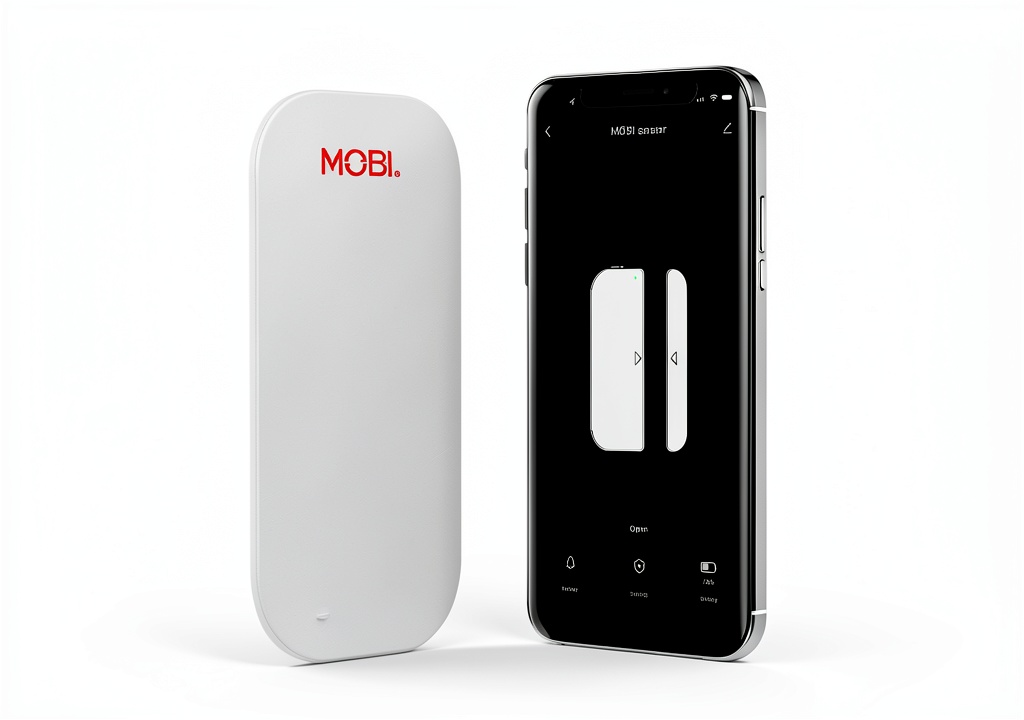
The MOBI sensor’s compact white design blends well with most door and window frames, but it’s not the smallest sensor I’ve tested. The magnetic contact piece is reasonably sized, and both components feel solid despite the plastic construction. The included adhesive tape held securely through temperature changes in my testing, though I’d recommend the screw mounting for high-traffic exterior doors.
What matters more than aesthetics is the sensor gap tolerance—how far apart the components can be while still detecting closure. MOBI claims up to 1.5cm separation, and in testing, this held true. However, on uneven door frames or windows with thick weather stripping, you might need to position carefully to maintain reliable contact.
Performance in Real Use
After installing these on my front door, home office door, and a frequently opened window, the notification reliability proved excellent. I received alerts within 2-3 seconds of opening, even when checking from cellular connection away from home. The app’s event history proved valuable when I needed to check what time a package was delivered.
However, the automation capabilities reveal the product’s limitations. While you can create basic routines like turning on MOBI smart lights when a door opens, the lack of IFTTT or extensive third-party support means you’re largely locked into the MOBI ecosystem. This became apparent when I tried to integrate with my existing Philips Hue lights—it simply wasn’t possible without workarounds.
Ease of Use
The setup process is genuinely beginner-friendly. Download the MOBI app, create an account, scan the QR code, and follow the pairing instructions. The entire process took under five minutes per sensor in my testing. The app clearly indicates connection status and provides straightforward settings for notifications and automation.
Where complexity emerges is in multi-sensor management. If you install 10+ sensors throughout your home, the app becomes cluttered, and there’s no grouping or zoning feature to organize them logically. This becomes frustrating when you just want to arm/disarm a specific area of your home.
Durability & Reliability
After three months of continuous use, including temperature fluctuations from 45°F to 85°F, all sensors maintained consistent performance. The battery level indicators in the app proved accurate, giving me about two weeks’ warning before needing replacement.
The WiFi connectivity remained stable, but I did experience one dropout during a storm when my internet briefly faltered. The sensors reconnected automatically when service restored, but this highlights the dependency on both your WiFi network and internet connection.
Pros & Cons
Pros:
- No hub required saves money and reduces complexity
- Reliable instant notifications with minimal delay in testing
- Easy installation makes it accessible for non-technical users
- Clean app interface with straightforward settings
- Affordable entry point for basic home monitoring
Cons:
- Limited third-party integration beyond basic voice commands
- No built-in alarm or siren capability
- WiFi dependency means potential connectivity issues
- Basic automation features compared to hub-based systems
- No temperature or vibration sensing like some competitors
Comparison & Alternatives
Cheaper Alternative: Tuya/Smart Life Compatible Sensors
At around $10-12 per sensor, generic Tuya-compatible sensors offer similar basic functionality but often require a Tuya hub for optimal performance. The setup can be more technical, and app experiences vary widely. Choose these if you’re technically comfortable and want the absolute lowest cost, but expect potential reliability trade-offs.
Premium Alternative: Aqara Door and Window Sensor
Priced around $20-25, Aqara sensors require an Aqara hub but offer superior reliability, faster response times, and extensive HomeKit and SmartThings integration. The battery life typically exceeds 2 years, and they include temperature sensing. Choose Aqara if you’re building a comprehensive smart home ecosystem and value reliability over simplicity.
Value Comparison: MOBI sits in the sweet spot between budget generic sensors and premium hub-based systems. You’re paying slightly more than the cheapest options for better reliability and a cleaner user experience, while avoiding the higher upfront cost of hub-based ecosystems.
Buying Guide / Who Should Buy
Best for beginners: If you’re new to smart home technology and want simple door/window monitoring without researching hubs and complex ecosystems, MOBI provides an excellent starting point. The straightforward setup and reliable basic features won’t overwhelm you.
Best for renters: The adhesive installation means no permanent modifications, and you can take the system with you when you move. The no-hub approach also means fewer devices cluttering your limited space.
Best for MOBI ecosystem users: If you already own MOBI cameras or smart plugs, these sensors integrate seamlessly, allowing you to create cohesive automations within a single app.
Not recommended for: Large homes with WiFi dead zones, advanced smart home users wanting extensive third-party integrations, or those needing professional security system features like alarm sirens and monitoring services.
FAQ
How reliable are the instant alerts in real use?
In my testing, alerts consistently arrived within 2-3 seconds of door/window opening. However, this depends on your WiFi reliability and internet connection. During one internet outage, I missed notifications until service restored.
Can I use these without the MOBI app after setup?
You need the app for initial setup and configuration changes, but basic open/close status can be checked through Alexa or Google Assistant once linked. Notifications, however, primarily come through the MOBI app.
How difficult is battery replacement?
Extremely simple—the cover slides off easily, and the app provides low-battery warnings with ample time to replace. Standard AAA batteries are readily available.
Will these work with my existing smart home system?
Only if you’re using Alexa or Google Assistant for voice control. There’s no native integration with SmartThings, Home Assistant, or IFTTT, which limits advanced automation possibilities.
Is the MOBI system expandable beyond door sensors?
Yes, MOBI offers cameras, smart plugs, and other sensors that integrate within the same app, creating a cohesive ecosystem. However, you’re largely locked into their ecosystem for advanced features.